

TK - Filter
Product filter module for OpenCart 3 with price, brand, options, attributes, stock and special offers. Update results without reloading the page.
Help customers find the right product.
TK - Filter </> TKdemo
Password:
demo
What you get
- Filter by price, categories and manufacturers.
- Use existing catalogue filters, options and attributes.
- Show in-stock products or products on special offer.
- Choose AJAX updates or standard page reloads.
- Control visible groups, their order and expansion.
- Optional product counts, radio buttons and checkboxes.
Suitable for
Stores with a larger catalogue where customers need a particular brand, size, price range or technical specification.
Before you buy
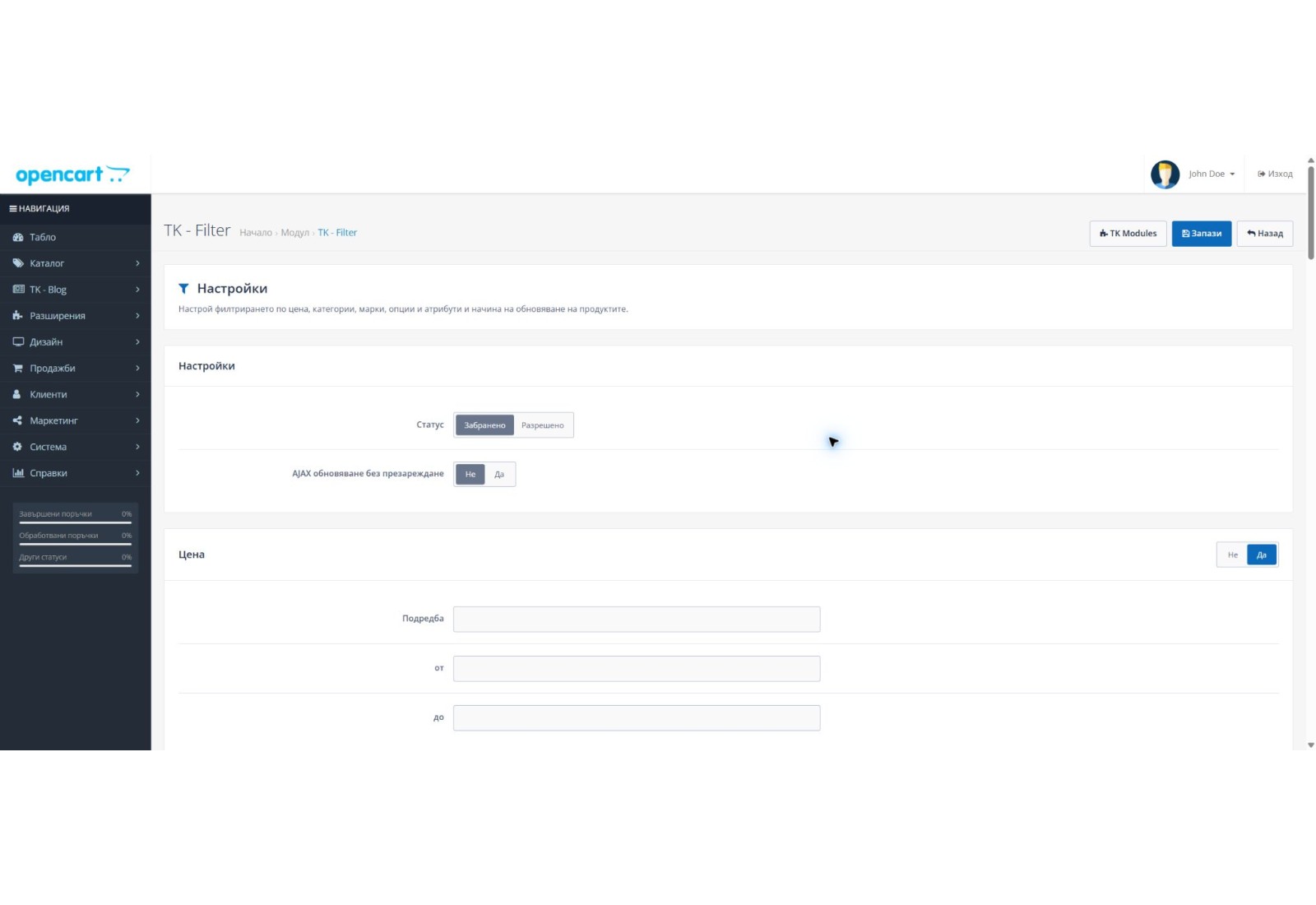
For OpenCart 3.x. Requires TK Modules and a tanko.dev API token for your domain. Filters use the data assigned to your products. Custom themes may need adjustments to the layout and AJAX updates. The gallery shows the actual settings. TK Filter is not yet enabled in the public demo store.
Final price including VAT
Free installation and configuration included
Domain, subdomains and multistore
One licence covers the domain and all its subdomains. For a multi-store setup, purchase the extension only for the main domain; all other stores receive it free of charge.
Leave a recommendation
What this extension does
TK Filter adds product filters to your OpenCart store. Customers can combine a price range, manufacturer and product specifications to narrow down the results.
You choose which groups appear, their order and which are expanded. A clothing store might show brand and size, while an electronics store can offer manufacturers and technical specifications stored as attributes.
The module uses the categories, manufacturers, filters, options and attributes you already maintain in OpenCart. There is no separate filter catalogue to fill in.
Filters for your catalogue
- Price — choose a price range.
- Categories — show all categories or the current category and its subcategories.
- Manufacturers — choose a brand.
- Standard OpenCart filters, product options and attributes.
- Stock — show products with a positive quantity.
- Special offers — filter products with a special price.
Control the visible groups
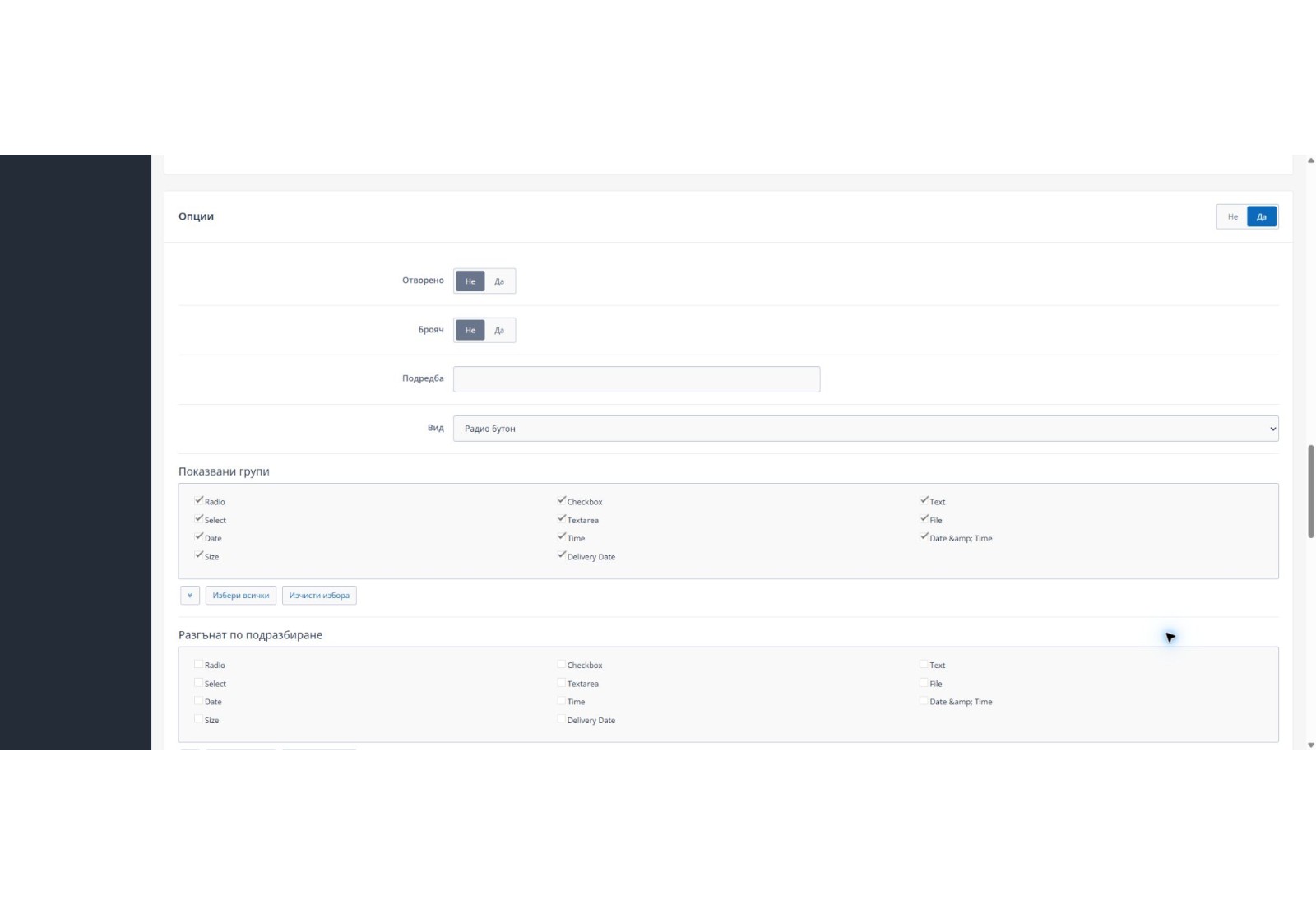
Enable the sections you need and set their order. For filters, options and attributes, choose the individual groups to display and which should be expanded by default.
Manufacturers, filters, options and attributes can use radio buttons or checkboxes. Product counts can be enabled separately for the supported sections.
Updating the results
Choose AJAX updates without a page reload or standard navigation. Selected criteria remain in the URL, and customers can remove active filters from the storefront.
Filtering is available for categories, manufacturer pages, search results and special offers. Add the module to the corresponding OpenCart layout.
Compatibility
For OpenCart 3.x, with Bulgarian and English languages. Themes that change the product list structure may need adjustments. Manufacturers, options, attributes and filters must be assigned to your products.
Installation with TK - Modules
TK - Modules is the free installer for installing and updating my OpenCart extensions.
- Download and install TK - Modules for OpenCart 3.
- Enter your tanko.dev API token and click Check for modules.
- Select the purchased TK - Filter module and start the installation.
View TK - Modules and installation instructions
Paid modules include free installation and configuration.
Activation
Open TK - Filter in the module list. Enter your tanko.dev API token and click Activate. Once the domain check succeeds, the settings become available. If access is denied, check access and modify permissions in your user group.
Configuration
- Set the status to Enabled and choose whether to use AJAX updates.
- Enable the sections you need: price, categories, manufacturers, filters, options, attributes, stock and special offers.
- Set the order, counts and selection type where available. For filters, options and attributes, select the visible groups and which should be expanded.
- Save the settings.
- In Design → Layouts, add TK - Filter to the desired column of the category layout. Add it to the manufacturer, search or special offers layouts if you want to use it there.
Check the storefront
Open a category containing products and test price and manufacturer filtering, combined criteria and clearing the selection. Check the mobile layout too. When using AJAX, test result updates, pagination and the browser Back button.
If a group is missing, check that it is enabled and that the products in the current list have the relevant data assigned.
Change history
Version 1.1
- No new features have been added in this release. The version is now consistent across the package and the update system.
