

TK - Withdrawal — purchase withdrawal for OpenCart
Order withdrawal form for OpenCart. Customers submit a request linked to their order and receive an email; you manage requests in the admin.
Keep purchase withdrawal requests and replies in one place.
TK - Withdrawal </> TKdemo
Password:
demo
What you get
- Signed-in customers choose from their own orders.
- Guests verify their order number and purchase email.
- Email confirmation and a copy of the submitted request.
- Statuses, history, internal notes and customer replies.
- Custom SEO URL and an optional footer link.
Suitable for
Stores that want withdrawal requests organised alongside the relevant orders, with less searching through emails and separate notes.
Before you buy
The module records requests and helps you communicate with customers. You still review each withdrawal, arrange the return and process any refund. TK Modules is required for activation.
Final price including VAT
Free installation and configuration included
Domain, subdomains and multistore
One licence covers the domain and all its subdomains. For a multi-store setup, purchase the extension only for the main domain; all other stores receive it free of charge.
Leave a recommendation
What this extension does
Give customers a clear way to withdraw from a purchase. The form links their request to an order, sends a confirmation and keeps the details ready for you to handle in the admin panel.
Why an online store needs a withdrawal function
Article 52a of the Bulgarian Consumer Protection Act, introduced in State Gazette No. 87/2026, requires an online withdrawal function for contracts concluded through an online interface where a right of withdrawal applies.
The function must remain visible and accessible during the withdrawal period. Customers receive confirmation with the submitted content, date and time. Read the official Bulgarian legal text, Article 52a.
The EU basis is Article 11a of Directive 2011/83/EU, inserted by Directive (EU) 2023/2673.
A clear form for your customers
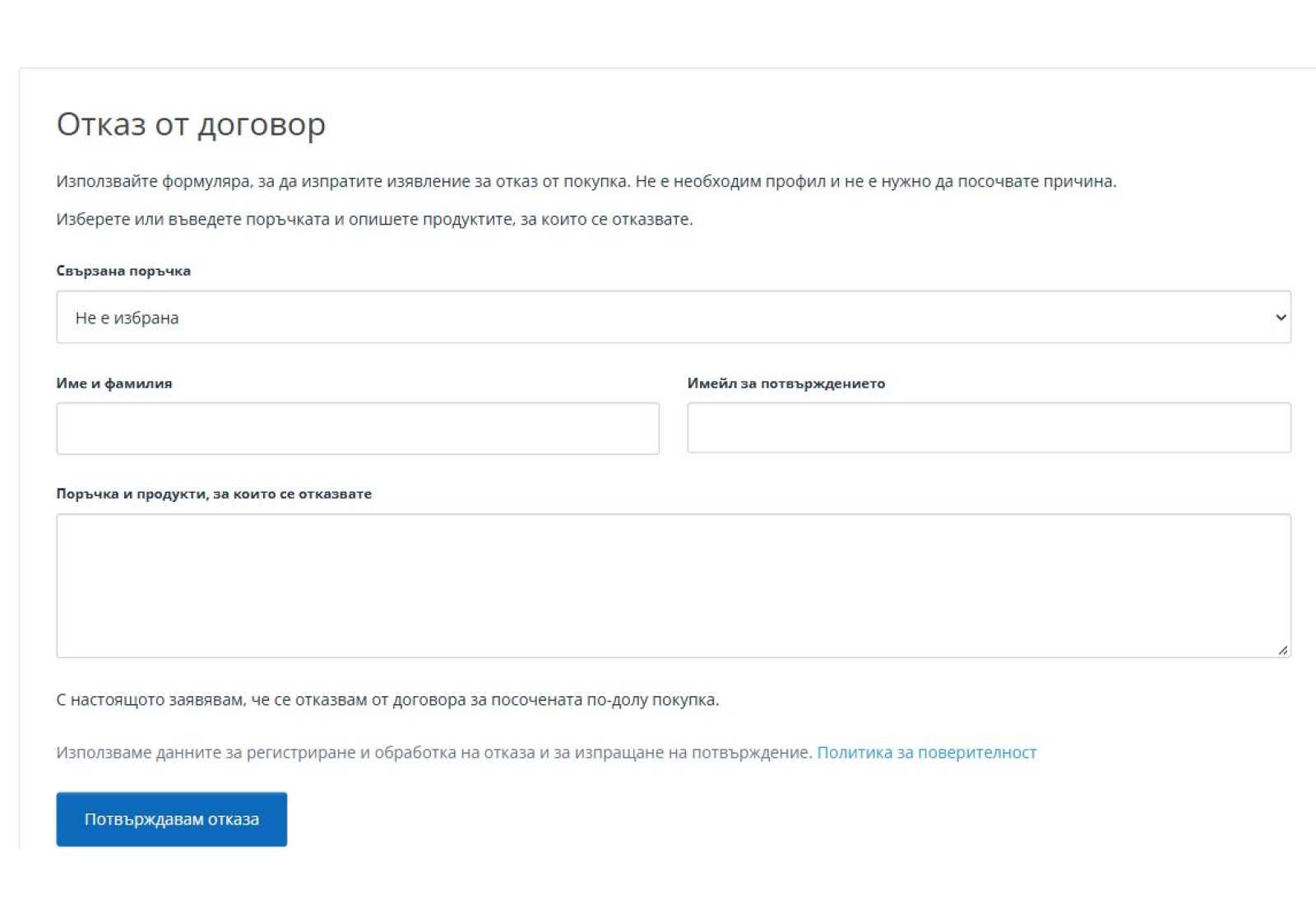
Customers identify the purchase and the products they want to withdraw from. They do not need to create an account or give a reason.
Signed-in customers choose from their own orders. Guests enter the order number and the email address used at checkout. Once these details are verified, the request is linked to the order automatically.
A confirmation for the customer, a record for your store
After submitting the form, customers receive an email confirmation and can save a copy of their request. The submitted text and time of receipt are kept with the record.
In the admin panel, you can open the linked order, change the status and follow the handling history. Add an internal note or send a reply directly from the request.
Settings for your store
- Custom SEO URL for the withdrawal page.
- Optional link in the footer.
- Links to your withdrawal terms and privacy policy.
- Email delivery through your OpenCart mail settings.
- Bulgarian and English languages.
- Separate versions for OpenCart 2.0, 2.1, 2.2, 2.3 and 3.x.
The confirmation records receipt of the request. It does not automatically approve a withdrawal or issue a refund.
Installation with TK - Modules
TK - Modules is the free installer for installing and updating my OpenCart extensions. It gives you access to the modules activated for your domain.
- Download and install TK - Modules for your OpenCart version.
- Enter your API token and click Check for modules.
- Select the module you purchased from the list and start the installation.
View TK - Modules and installation instructions
Paid modules include free installation and configuration.
User permissions
In User Groups, grant access and modify permissions for the module's new pages.
Installation and configuration
In the extensions section, find TK - Withdrawal. Install the module and open its settings.
Enter the activation token provided to you. It is checked through the API and validated for your domain. Once activated, the module settings become available.
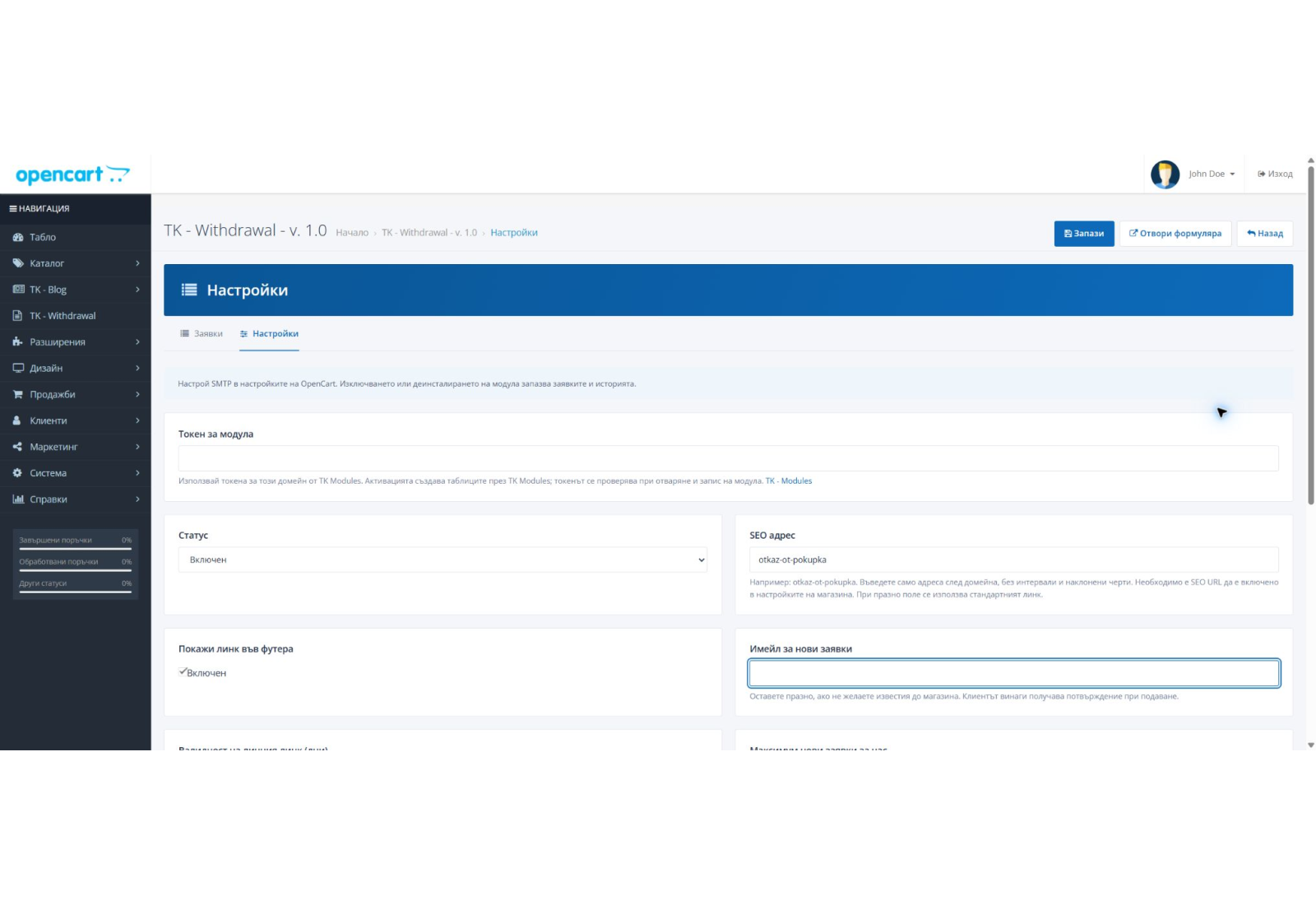
TK - Withdrawal settings
Enable the module, enter its SEO URL and choose whether to show a footer link. OpenCart SEO URLs must be enabled for the friendly address to work. Select your withdrawal terms and privacy pages, then check your email settings.
Change history
Version 1.1
- Added a purchase withdrawal form and management of submitted requests.
- Request statuses, customer replies and multilingual page settings.
Version 1.0
- Purchase withdrawal form with order linking.
- Order selection for signed-in customers and order number and email verification for guests.
- Confirmation, history, statuses and replies from the admin panel.
- Custom SEO URL and optional footer link.
- Versions for OpenCart 2.0, 2.1, 2.2, 2.3 and 3.x.
