

TK - Checkout - one-page checkout with courier integrations
One page checkout for OpenCart with customer details, shipping, payment and cart editing. Includes courier integrations and three layouts.
One-step checkout for OpenCart with courier integrations
TK - Checkout </> TKdemo
Password:
demo
What you get
- Three layouts: Classic, Modern and Shopify Style.
- Customer and company fields tailored to your store.
- Address or office selection according to the delivery method.
- Works with supported courier integrations and shipping methods.
Suitable for
Stores looking to organise checkout and make delivery selection easier.
Before you buy
Before purchasing, confirm the couriers and payment methods you need so we can check the required modules and theme compatibility.
Courier extensions for TK - Checkout










Final price including VAT
Free installation and configuration included
Domain, subdomains and multistore
One licence covers the domain and all its subdomains. For a multi-store setup, purchase the extension only for the main domain; all other stores receive it free of charge.
Leave a recommendation
What this extension does
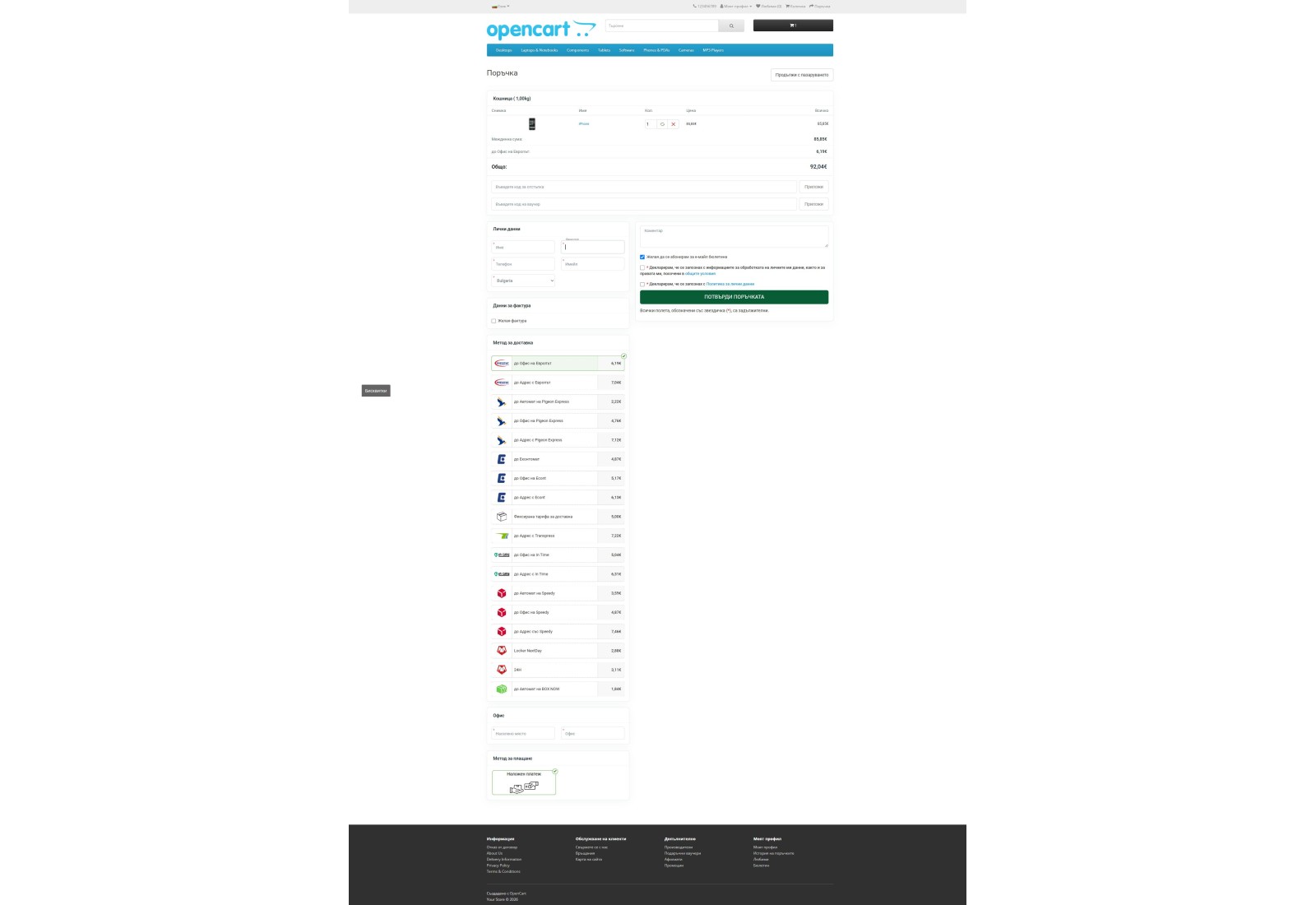
TK - Checkout brings the entire order process onto one page: customer details, address, delivery, payment and a review of the products. Customers can see what they are ordering and how the final total is calculated without moving through a sequence of separate checkout steps.
For store owners, the module provides control over the fields and layout of the checkout page. You can collect the information needed to process an order, serve individual and business customers, and configure checkout to match the way your store works.
What data does TK Checkout use?
When you activate a module, check its licence or request an update, TK Checkout connects to the tanko.dev API. Depending on the request, it sends the store domain, installation token, module code and version, OpenCart version and type of operation. The API logs the request, its date and time, and the IP address it came from. Requests for courier module settings also identify the courier.
Licence checks do not retrieve your customer database or orders from your store. Activation and updates do not send customer names, phone numbers, email addresses, delivery addresses, order contents or payment details.
When you create a shipping label, the recipient and delivery details go to the selected courier. These details are not sent to the tanko.dev API.
Main features
- Guest checkout and customer accounts. Supports orders without registration, login for existing customers and account creation during checkout, depending on your OpenCart and module settings.
- Customer and company details. Names, phone numbers, email addresses, customer groups and custom fields. Use OpenCart custom fields to collect company names, business registration numbers and other invoice details.
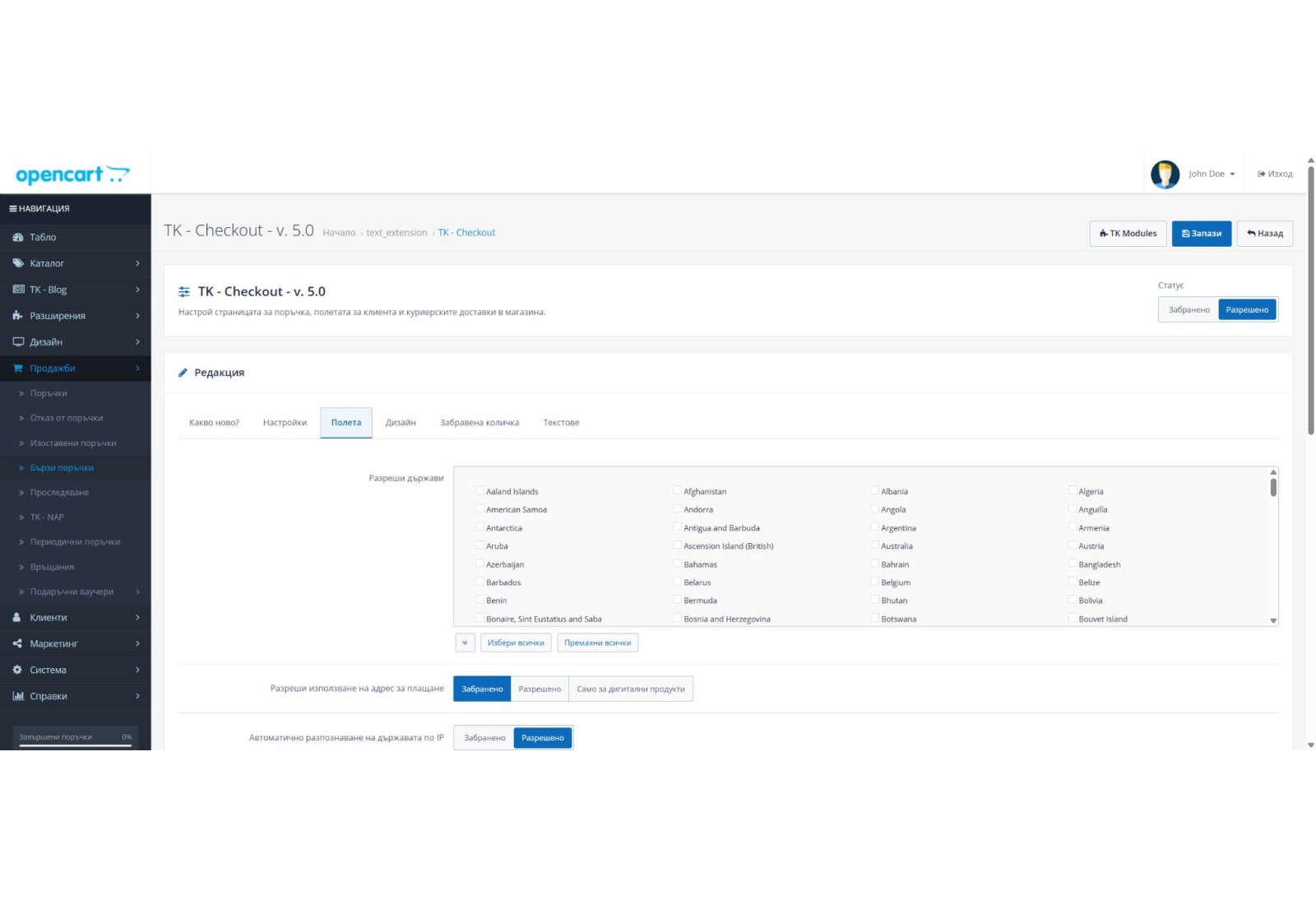
- Address fields that match the delivery method. Displays the fields needed for the selected method. You can choose the permitted countries and hide the country selector when the store serves a single country.
- Shipping and payment selection. Works with standard OpenCart methods and compatible additional extensions. Confirming the order starts the process required by the selected payment method.
- Cart editing during checkout. Customers can change quantities and remove products. The cart and totals update without reloading the entire page.
- Discounts and order totals. Supports coupons, gift vouchers, reward points and account credit when the corresponding store features are enabled. Taxes, shipping and other applicable totals are included in the order calculation.
- Validation before confirmation. Checks the required information and displays missing or invalid details so customers can correct them. It also follows OpenCart settings for stock availability and out-of-stock checkout.
- Preserved form entries. Information is kept in the current session so customers can return to checkout without entering everything again.
Settings for the way your store works
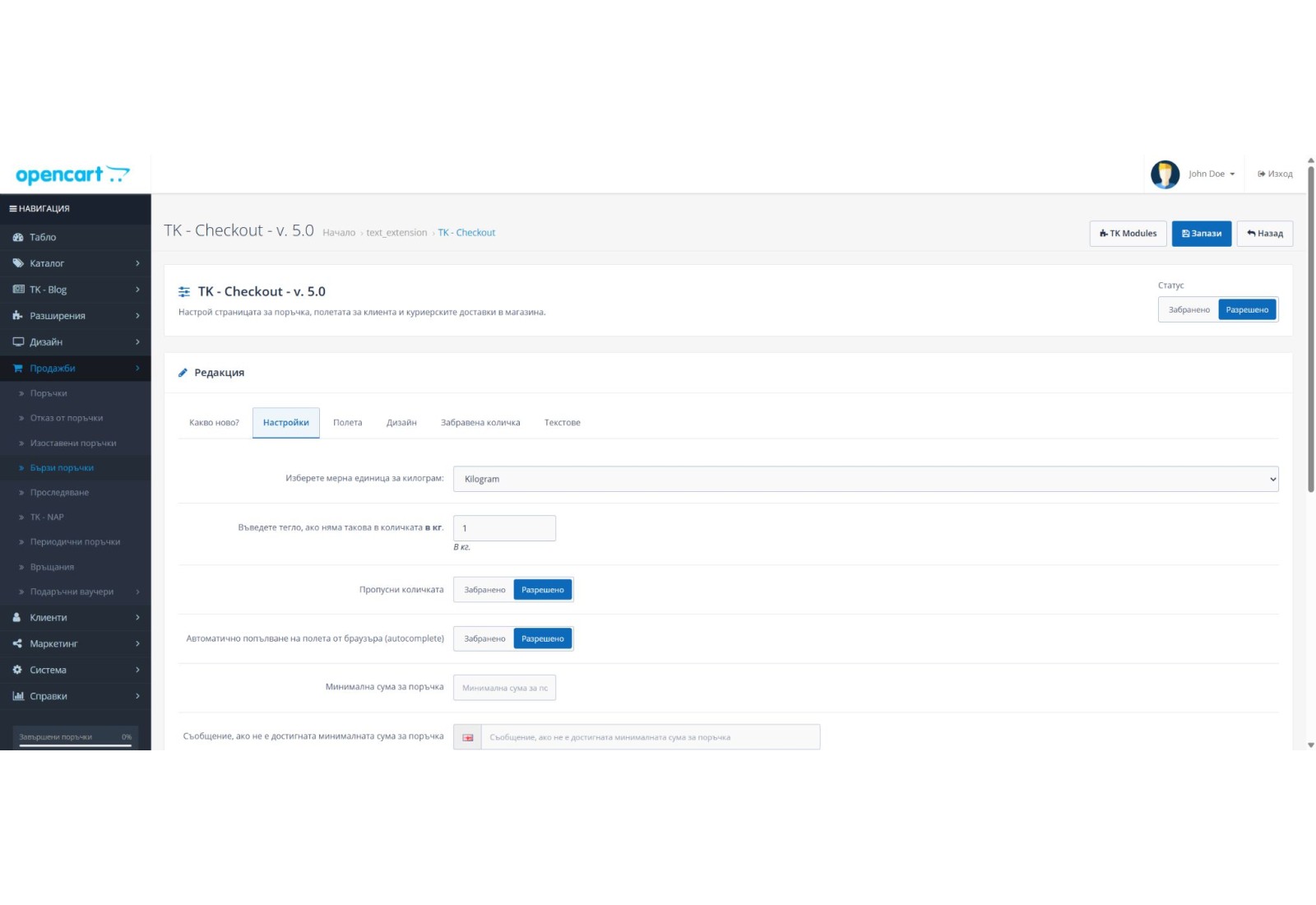
Manage phone and email requirements, custom fields, invoice details and registration behaviour from the administration panel. You can edit field labels, headings and confirmation button text, as well as links to your terms and privacy policy.
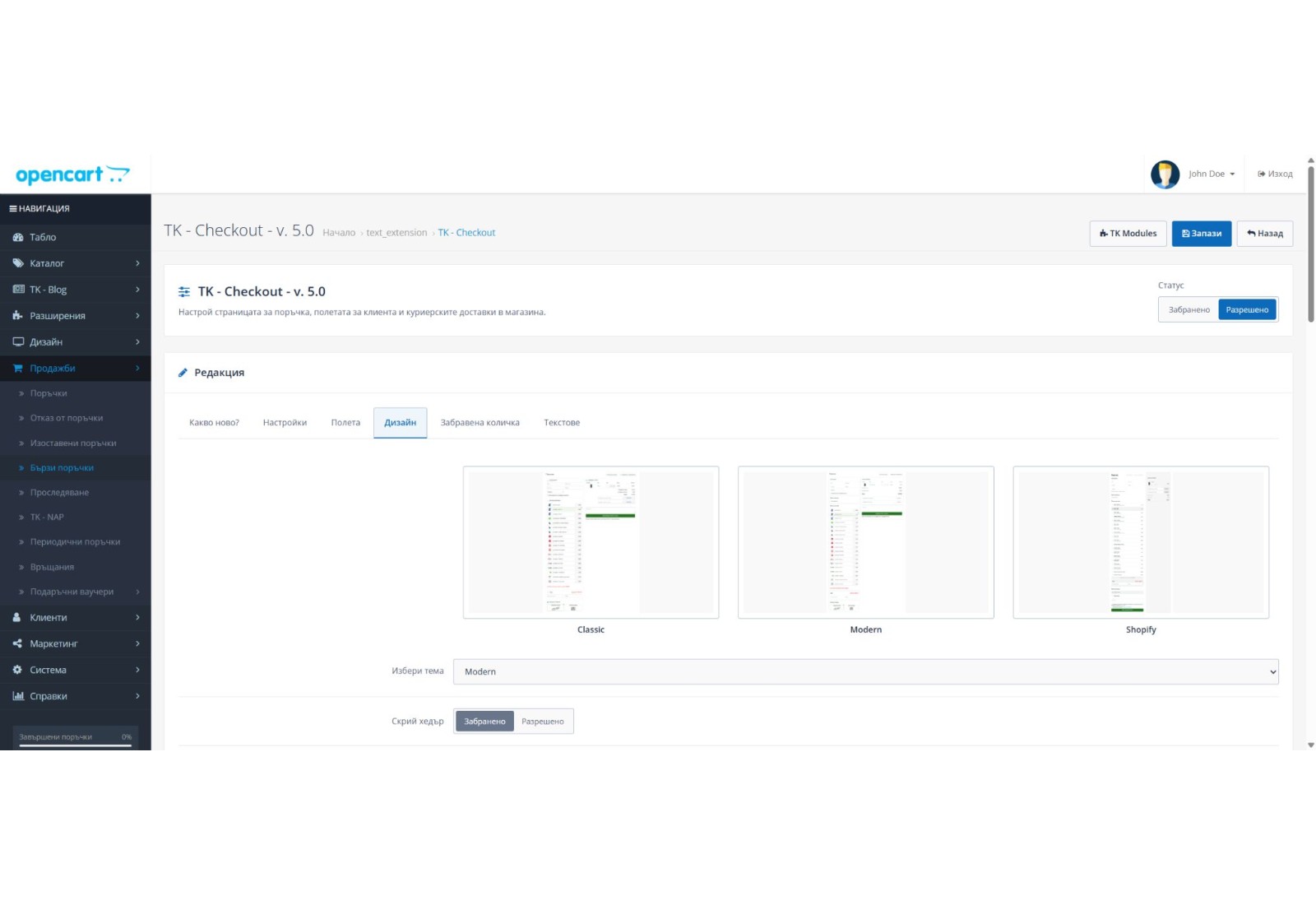
Choose a one-column or two-column field layout, label positioning and whether to display the main header and footer. These settings help adapt checkout to your store's content and visual style.
Three ready-made layouts
Choose between Classic Design, Modern Design and Shopify Style. The features tab shows the Modern checkout and the settings for customer fields and design. Use the demo store button to explore a working example.
Abandoned carts and automatic reminders
TK - Checkout saves products, quantities, selected options and the details entered while using the checkout page. In the Abandoned Carts administration section, you can review the saved information, add a comment, change the cart status and send an email manually. Adding a product to the cart without starting checkout is not enough to capture customer details.
When an automatic email is sent
- Automatic emails must be enabled in TK - Checkout, with a working cron task on the hosting account.
- The cart must have a valid email address and at least one saved product with a positive quantity.
- The last cart update must be at least 24 hours but less than 72 hours ago. New checkout activity postpones the reminder.
- Only the most recently updated cart for the same email address in the same store is considered. Each cart receives at most one automatic reminder. Any cart email sent to that address in the previous 72 hours blocks another automatic email, including emails sent manually.
- Carts marked as Converted, Processed or Cancelled are skipped. A linked order with an assigned order status also prevents sending. An additional check looks for a recent order for the same email address and store, counted from the start of the day three days ago.
Example: with cron running daily at 10:15, a cart updated on Monday at 11:00 becomes eligible on Wednesday at 10:15. On Tuesday, 24 hours have not yet elapsed. If cron does not run while the cart is within the 24-to-72-hour window, no automatic reminder is sent.
Email and cron setup
Configure the subject, text before and after the products for each language, and the product information shown in the email. To let customers return to their cart, insert a link whose address is {add_to_cart_link} in the email text. Mail and SMTP settings come from the standard OpenCart store configuration.
How cart recovery works
The email link contains an individual secret key. It restores saved products, quantities, options and available customer details into the current session, then takes the customer to checkout. Products currently in the cart are replaced by the saved products. The link does not sign the visitor into another customer account.
Email prices are the product prices saved with the cart. On returning to the store, checkout recalculates current prices, stock availability, shipping and the final total. A reminder does not reserve stock or guarantee an expired promotion.
Starting an online payment does not prevent recovery while the order still has no assigned status. Once the linked order receives a status, that cart can no longer be restored through the link. Manual sending from the administration panel is a separate action and does not wait for the automatic 24-to-72-hour window.
Installation
Installation and updates are handled through TK - Modules. Follow the steps in the installation tab.
If your store uses additional payment extensions or a specific theme, check compatibility before purchasing. Some integrations may require additional configuration.


Customer details
First name, last name, phone and email.
Customer type:
Standard OpenCart customer groups, configurable for individuals and businesses.
Custom customer fields:
Standard OpenCart custom fields for collecting business details such as company registration number and company name.
Country selection:
Configure the countries your store serves through OpenCart's standard settings. If only one country is allowed, it is selected automatically and the field is hidden. The module also has a single-country selector that hides the field.
Shipping methods
Use standard OpenCart shipping methods and additional compatible shipping extensions.
Address or office selector
Address or office fields appear according to the selected shipping method. With Pickup, address fields stay hidden and the store location from OpenCart's standard settings is used.
Payment methods
Standard payment methods work normally. With Cash on Delivery (COD), the COD fee is calculated if the shipping modules are configured for it. Some additional payment modules may need extra code to start their payment process.
Cart
Includes standard OpenCart cart elements. If stock checks find insufficient availability and OpenCart does not allow out-of-stock checkout, the customer is redirected to the standard cart with the relevant stock messages. Buttons update or remove products without reloading the page. Shipping price changes also update the cart without a page reload.
Order adjustments
- Reward points - Enter points earned by a registered customer and recalculate the cart without reloading the page.
- Discount code - Enter a discount code and recalculate the cart without reloading the page.
- Voucher - Enter a voucher code and recalculate the cart without reloading the page.
- Store credit - Automatically applies available credit to registered customer accounts.
- Other adjustments - Standard order adjustments, such as taxes and low order fees, are added automatically.
Account registration
Checkout uses guest mode by default unless OpenCart settings require registration. Existing customers can sign in using the buttons at the top right. Selecting Save my details asks the customer to enter a password and creates an account.
Completing checkout
After clicking Confirm order , all details are validated and any errors appear together across the checkout. If everything is valid, the process for the selected payment method starts.
Abandoned carts
The module records products and entered customer details while checkout is used. Administrators can review carts, add comments, change their status and send emails manually.
With automatic emails enabled and cron configured, a reminder is sent between 24 and 72 hours after the last update. Checks cover the email address, saved products, the latest cart for the same email and store, previous emails and recent orders with an assigned status.
A payment attempt whose order still has no assigned status remains recoverable. Once the linked order receives a status, the cart is excluded from recovery and automatic reminders; creating the order alone does not delete the saved cart.
The secure email link replaces the current cart products with the saved products and returns the customer to checkout. Full conditions, email settings and a cron timing example are available in the main product description.
Design
The checkout uses its own independent CSS file. Its layout can be adapted to each store's needs without relying on the site's styling.
Languages
The checkout module is available in Bulgarianand English
Functionality
The module uses standard OpenCart approaches, methods and functions and works with the system's standard built-in modules. Installing the module does not replace existing files.
Installation with TK - Modules
TK - Modules is the free installer for installing and updating my OpenCart extensions. It gives you access to the modules activated for your domain.
- Download and install TK - Modules for your OpenCart version.
- Enter your API token and click Check for modules.
- Select the module you purchased from the list and start the installation.
View TK - Modules and installation instructions
Paid modules include free installation and configuration.
Change history
Version 5.0
- Improved abandoned cart emails: they use the store mail settings, restore carts through a secure link and avoid repeated reminders for completed orders.
- Improved handling of the selected delivery method, payment method and customer group during checkout.
- More reliable module installation and updates, with clearer error messages.
- In courier forms with a Calculate price button: changing the address, office/locker, recipient, weight, cash on delivery amount or other details hides Create shipping label and shows Calculate price again. A label can be created after a successful recalculation.
- Added protection against using an outdated price when shipment details change while the calculation is in progress.
Version 4.9
- Added Modern and Shopify layouts.
- Improved abandoned cart management, including checks for a recent completed order;
- More flexible shipping rules
- Added options to hide the header/footer
- Improved field validation and error display.
- BOX NOW - added settings for Croatia and Cyprus.
- Econt - improved loading and saving of the selected office, weight calculation and combining products in a shipment.
- euShipments - expanded town and postcode details and improved shipment administration and status display.
- Evropat - separate weight limits, prices and free shipping conditions for office and address delivery, plus configurable method text.
- InTime - town search with automatic postcode entry and a choice of office or address delivery.
- NextLevel - improved town, office and locker search and selection, with clearer errors for missing selections or addresses.
- Pigeon - improved town search and address, office and locker selection; added automatic shipment status notifications.
- Sameday - improved API error handling and automatic actions when shipment statuses change.
- Speedy - improved office and locker loading and saving of address details; adapted street, number and entrance field display.
- Transpress - added dispatch from a store or office, label print format and transport payer selection.
Version 4.8
- Added support for more couriers in one checkout: Econt, Speedy, BOX NOW, Transpress, NextLevel, Sameday, euShipments, InTime, Pigeon and Evropat.
- Improved TK - Checkout for more reliable shipping, address, office, locker and payment selection and order completion.
- Unified courier module design with clearer headings, logos, buttons and admin layouts.
- Improved calculation, creation, printing and cancellation of shipping labels in popups without reloading the page.
- Added protection against duplicate shipping labels.
- Improved label cancellation and admin information updates.
- Improved pricing for address, office and locker delivery.
- Improved saving of town, address, postcode, shipping method and payment method in orders.
- Improved cash on delivery logic and submission of amounts and options to couriers.
- Added a Speedy setting: Inspection and testing only with cash on delivery.
- Improved Speedy address, office and locker delivery and label creation.
- Improved Econt office and locker search, address handling and recovery from temporary errors.
- Improved Pigeon handling of addresses, offices, lockers and registered customers.
- Improved address data storage for Evropat.
- Improved Sameday town, region and locker search, plus label creation and cancellation.
- Improved Transpress handling of saved customer addresses and opening labels in the admin panel.
- Improved BOX NOW locker selection and error messages.
- Improved euShipments error messages, label creation and opening documents.
- Improved handling of registered customers.
- Reduced manual admin work with automatic data entry, calculation and updates.
- Added clearer courier error messages.
- Improved reliability throughout order creation and processing.
Version 4.7
- Added Pigeon Express
- Added billing address entry
- Fixed weight issues in some stores using grams
- Fixed conversion from different currencies to the courier's currency
- Improved checkout loading speed and overall performance
- Updated all courier modules with conversion to their required currencies.
- Updated all couriers to use multi-cURL shipping price requests, making checkout loading at least three times faster.
- Fixed several reported bugs
Version 4.6
- Added InTime
- Added the PlatiPosle payment option
- Added remote module updates without downloading and uploading files manually
- Added a BGN-to-EUR conversion fix for COD amounts and shipping price requests
- Added the standard CAPTCHA option
- During registration, matching email and password now sign the customer in instead of showing an account-already-exists message
- Added a modification to prevent SMTP errors from blocking order completion
- Fixed several reported bugs
Version 4.5
- Added euShipments
- Improved loading speed
- Fixed status synchronisation bugs
- Fixed abandoned cart bugs
- Added town directory synchronisation for Greece and Romania in Econt and Speedy
Version 4.2
- Added Greece and Romania for Econt
- Added Greece and Romania for Speedy
- Added shipping modules for Greece and Romania with built-in town directories and weight-based pricing
- Fixed coupon issues with Econt's COD without receipt service
- Added Econt's new shipment location statuses
- Added Speedy's COD without receipt service
- Added a cart position option for the checkout page
- Added a maximum order amount setting
- Fixed customer-reported undefined variable warnings
- Optimised courier data validation for faster execution
- Fixed Sameday amount calculation and delivery address bugs
- Fixed a packaging type issue preventing BOX NOW label creation
- Fixed Transpress issues in the live environment
- Removed Facebook login because frequent Facebook platform changes required ongoing updates
Version 4.1
- Added text-type product option fields to abandoned carts
- Added shipping VAT calculation where applicable under OpenCart settings
- Added a debug option for various statistics
- Fixed inclusion of BOX NOW shipping in the cash on delivery amount
- Fixed error retrieval for PHP 8.2
- Fixed breadcrumbs with the Journal theme
- Fixed calculations with TK - Special Shipping
- Fixed adding transport to the Econt shipment item list
- Fixed initial COD percentage calculation when cash on delivery was not the default payment method
- Fixed Econt discount calculations
- Fixed Econt pallet shipping price calculations
- Fixed duplicate names on Econt labels
- Fixed quotation marks in product names sent to Econt
- Fixed module version checks
Version 4.0
- Fixed Speedy shipment payer bugs
- Adapted the code for PHP 8.2
- Added Sameday integration, including easybox lockers
Version 3.8
- Fixed weight calculations involving product options
- Fixed missing shipping and payment methods for digital products that require no shipping
- Fixed a missing bank transfer description
- Fixed order status updates from shipping labels after IP address changes
- Added optional customer-selected surcharges and discounts through TK - Special Total
- Added abandoned cart reminder emails, with an email template field and a cron task for sending
- Optimised Speedy and Econt pricing code
Version 3.7
- Added the Next Level shipping module
- Fixed BOX NOW shipping in the COD amount
- Added Speedy shipping discount cards
- Fixed shipping status synchronisation bugs
- Added courier checks for unsupported countries
Version 3.6
- Changed admin shipment status refreshes to prevent the site from hanging when handling many labels.
- Fixed several courier-to-OpenCart status mapping bugs.
- Added a shipping price timeout check at checkout. If no price arrives within 20 seconds, fixed pricing is used.
- Added configurable weight limits for office and locker selection in the admin panel.
- Fixed Speedy office and address selection in the admin panel.
- Added a Speedy admin option to include the postal money transfer fee in shipping calculations.
- Fixed missing checkout sessions.
- Unified functions across shipping methods.
- Fixed a missing order success page with EcontPay.
- Removed a large amount of unnecessary code.
Version 3.5
- Fixed missing Econt orders
Version 3.4
- Reviewed all files for errors and warnings and standardised code formatting to support modifications that rely on consistent code structure.
- Added item quantities to the description when generating Econt and Speedy labels
- Fixed Speedy weight calculations
- Fixed weight-based pricing for all couriers
- Fixed percentage-based amounts for Econt
- Added BOX NOW availability controls based on categories and cart weight
Version 3.3
- Fixed Speedy label creation for shipments with multiple parcels
- Fixed Econt multistore support
- Added a BOX NOW widget link field
- Fixed Speedy COD payments for Romania
- Fixed compatibility with TK - Special Shipping free shipping rules
- Fixed currency conversion for Speedy in Romania
- Removed unnecessary checkout requests to speed up shipping and payment method changes
- Fixed EcontPay payments
Version 3.2
- Added BOX NOW
- Added selection of order totals used to calculate free shipping
- Added checks for failed and ongoing office directory updates
- Fixed customer-reported bugs
Version 3.1
- Added courier integration for orders created in the OpenCart admin panel
- Added text translation through the admin panel
- Added a button to create custom invoice fields quickly
- Fixed total calculations for stores displaying VAT separately
- Fixed undefined variables and array indexes
- Optimised checkout page code
- Added out-of-stock handling: messages, asterisk markers and blocked form submission
Version 3.0
- Added Transpress integration
- Fixed abandoned cart bugs
- Econt - optimised shipment status synchronisation
- Econt - fixed repeated emails during status synchronisation
- Speedy - fixed Romanian address issues
- Added newsletter subscription during registration
- Added automatic registration with a generated password
Version 2.9
- Speedy - replaced SOAP with API requests throughout
- Speedy - fixed shipping payer selection
- Econt - updated office selection from the map
- Econt - optimised synchronisation requests to reduce CPU usage
- Corrected the Facebook login directory structure
- Extended cURL request timeouts
- Fixed weight calculations for products with options
Version 2.8
- Added sorting for locker, office and address delivery methods in Econt and Speedy
- Further refined Speedy shipping addresses for correct import into MySpeedy
- Improved small-town address selection for both couriers. If no addresses are found, address fields are hidden and the Additional details field remains, with a message asking the customer to enter the address there.
- Changed how countries available at checkout are selected.
- Added control over the region field: display it next to the country, in the address section, or hide it. This matters when payment or shipping availability depends on the region. For example, Sofia can offer a local courier while Varna shows another shipping method.
- Added phone field controls: strict validation with exactly 10 digits, standard validation with 3-15 characters, no validation or a hidden field.
- The Save details for my next order field can appear in customer details or directly after the cart. New customer registration can also be disabled.
- Added selection of the checkbox field for I need an invoice
- Added one-column or two-column checkout field layouts
- Added colour selection for the Confirm order button
- Added an admin colour picker
- Added admin editing of payment method icons
- Added admin editing of shipping method icons
Version 2.7
- Made weight-based shipping rates take priority over automatically calculated prices
- Fixed guest checkout for products that do not require shipping
- Fixed Speedy inspection option selection
- Added paid-out and returned Econt shipment statuses for reporting.
- Fixed popup payment methods
- Fixed compatibility with the FiBank module
- Fixed dispatch addresses for multiple Speedy customer numbers
- Refined Speedy address delivery data for correct label validation
- Added entrance, floor and apartment fields for Speedy
Version 2.6
- IMPORTANT - The Speedy module now also supports Romania
- Important - Speedy no longer allows Standard 24 for shipments over 50 kg. In this release, Speedy offices are disabled above 50 kg; address delivery remains available only with fixed weight-based pricing. Labels cannot be generated for shipments over 50 kg.
- For Speedy shipments over 50 kg, a rate from Weight-based pricing is used if configured. If the price is BGN 0, a message says the price will be confirmed later.
- Speedy shipments over 32 kg are automatically split into two parcels because a single parcel over 32 kg is not permitted.
- Added office or address dispatch selection for each customer number in a Speedy account
- Added Paid out and Returned shipment statuses for Econt
- Fixed company name submission to Econt when invoice fields are used.
- Fixed an EcontPay bug
- Fixed the admin status update button
- Added a shipment tracking link and button in the admin panel
- Fixed large numbers in weight-based pricing
Version 2.5
- Major improvements to the payment method - EcontPay
- Improvements to the Abandoned Orders section - added conversion of an abandoned order into a real order, manual deletion, status tracking and abandoned order filtering
- Econt - added percentage-based pricing. Choose the share of shipping paid by the recipient and by the sender.
- Econt - added label cancellation directly from the admin panel
- Econt - added submission of free shipping to delivery.econt.com even when it cannot be configured in Delivery settings, such as free shipping from a coupon or weight-based rule.
- Fixed minor undefined variable bugs.
Version 2.4
- Changed the payment method from Guaranteed by Econt to EcontPay
- Added resubmission of order details to delivery.econt.com after admin edits.
- Fixed Econt shipping status updates
- Fixed handling of missing Econt server responses when retrieving prices
- Fixed image paths for the Guaranteed by Econt logo
- Fixed custom fields for registered customers
- Added a product list to the Comment field when generating Speedy labels
- Fixed weight handling when generating Speedy labels
Version 2.3
- Added a fix for UniCredit instalment payments
- Added a parameter to return to the correct page after creating a shipping label
- Prevented manual text entry in popup-populated courier office and address fields
- Added a fix for products that do not require shipping
- Added titles for custom radio-button fields
- Fixed gram-to-kilogram calculations for both couriers
- Speedy - fixed submission of correct address delivery details
- Speedy - fixed shipments requiring testing or inspection
Version 2.2
- Fixed checkout for products that require no shipping, such as vouchers, images, MP3s and ebooks.
Version 2.1
- Added module validation by token and domain.
Courier extensions for TK - Checkout
Each courier page lists its features and setup steps. Install the integration through TK - Modules.
TK - Econt
Econt shipping module for OpenCart: delivery to addresses, offices or lockers and shipping label preparation. Requires TK Checkout.
TK - Speedy
Speedy shipping module for OpenCart with address, office and locker delivery, shipping rates and labels. Requires TK Checkout.
TK - BOX NOW
BOX NOW locker delivery module for OpenCart. Customers select a locker at checkout for shipment preparation. Requires TK Checkout.
TK - Sameday
Sameday shipping module for OpenCart with address and easybox delivery, shipping rates, labels and tracking. Requires TK Checkout.
TK - Transpress
Transpress shipping module for OpenCart. Prepare shipping labels, set prices and weights and track shipment status. Requires TK Checkout.
TK - Evropat
Evropat shipping module for OpenCart with office and address delivery, shipping labels and cash on delivery. Requires TK Checkout.
TK - InTime
InTime shipping module for OpenCart with office and address delivery, shipment preparation and cash on delivery. Requires TK Checkout.
TK - Pigeon Express
Pigeon Express shipping module for OpenCart with address, office and locker delivery, labels and cash on delivery. Requires TK Checkout.
TK - NextLevel
NextLevel shipping module for OpenCart. Calculate rates, prepare labels and track shipments using your account's services. Requires TK Checkout.
TK - euShipments
Connect OpenCart to euShipments for shipping rates, labels and tracking with the couriers available in your account. Requires TK Checkout.

TK - Shipping to Greece
Configure shipping to Greece in OpenCart with weight-based or fixed rates. Requires TK Checkout; does not connect to a courier API.

TK - Shipping to Romania
Configure shipping to Romania in OpenCart with weight-based or fixed rates. Requires TK Checkout; does not connect to a courier API.
