
When using Econt, you may see the Bulgarian message „Изплащане на наложен платеж чрез пощенски паричен превод не се предлага от 25.09.2026 г.“ It says that cash on delivery payouts via postal money transfer are no longer available from 25 September 2026. If you receive this error, check the cash on delivery agreement in delivery.econt.com. In the case shown here, the solution is to remove the old setting and select the new agreement from the list.
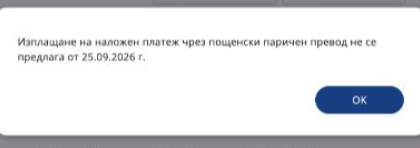
How to select the new agreement
- Sign in to delivery.econt.com with the account used for your store.
- Select the correct store and open Settings → Cash on delivery (Настройки → Наложен платеж in Bulgarian).
- In the Agreement (Споразумение) section, remove the old setting using the trash icon on the right of its row.
- Click „Нова настройка за споразумение“ (New agreement setting) to add a new one.
- Select your new, current agreement from the list. Check which countries the setting applies to.
- Make sure the new agreement is displayed, then repeat the action in your store that triggered the error.
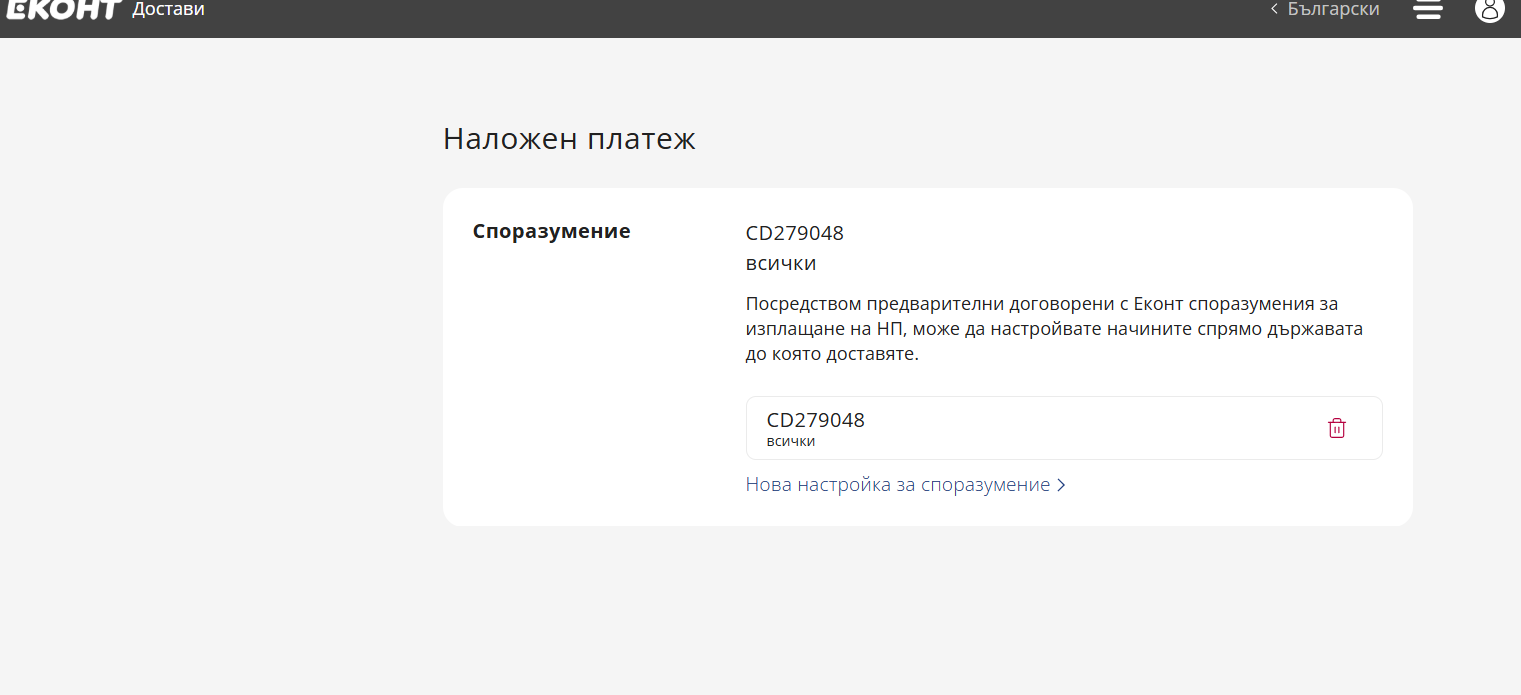
You are removing the old agreement setting in Deliver with Econt. Your new agreement must already be available for selection in your account.
Econt’s official instructions
See Deliver with Econt: cash on delivery settings (in Bulgarian). Econt explains how to choose a payout method from the dropdown and states that the system remembers the selection automatically.
If the new agreement is missing or the error persists
Check that you are using the correct account and store in delivery.econt.com. If the new agreement is missing from the list, contact your Econt office or representative to check whether it is available and active for your account.
If you have changed the agreement but still receive the message, send support the exact error text and explain which action triggers it.
