
A courier appears at checkout but returns no shipping price. Or delivery to an office works while delivery to an address does not. TK - Checkout's debug option can help you see what happened during the courier request before you start changing settings.
It writes diagnostic information to the store's log file. Depending on the courier and module version, this can include the request data, the API response, calculated prices or a connection error. The level of detail is different for each integration.
Debug logging helps you identify the cause. Enabling it does not change prices or fix the settings. The screenshots below show the Bulgarian administration of oc.tkdev.eu, running OpenCart 3 and TK - Checkout 4.9.
1. Enable the debug option
- Sign in to the store administration.
- Open Extensions → Extensions and select Modules from the extension type list.
- Find TK - Checkout and click the blue pencil button on its row.
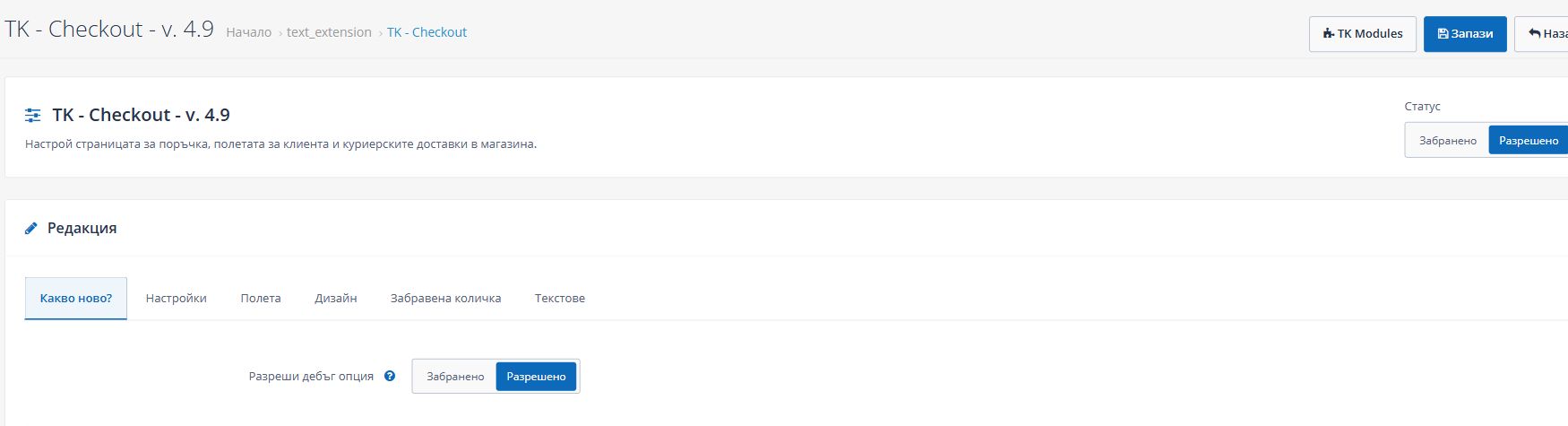
- Open the What's new? tab and enable the debug option. In the screenshots it is labelled „Разреши дебъг опция“; choose „Разрешено“.
- Click Save in the upper right. Changing the switch alone does not save the setting.
Older module versions may place or label the option differently. Use the debug setting, not the module's main status and not OpenCart's setting for displaying PHP errors to visitors.
2. Reproduce the exact problem
Logging captures new actions after it has been enabled. Opening the log alone will not recreate an earlier failed request.
- Note the time of the test, including the minutes.
- Visit the storefront and add a product that requires shipping.
- Go to checkout and enter the details needed for a shipping quote: country, town and address, office or locker, depending on the method.
- Select the affected courier and wait for the calculation. If the problem affects a particular office or product, use the same one.
- Note the result: no price, a disappearing method, a message or a price that differs from what you expected.
You do not need to place an order or create a shipment to check a shipping quote. Start with one clear test. Repeatedly changing towns, products and offices makes the resulting log harder to follow.
3. Open the log file
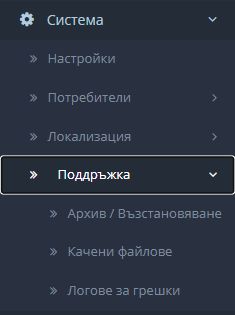
In the administration, open System → Maintenance → Error Logs. Standard OpenCart uses the store's general log, usually error.log. It also contains messages from other modules, so look for entries near the time of your test.
Refresh the log page after testing. New entries are appended at the end. If the file is too large to display in the administration, download it and open it locally in a text editor. You do not need to clear the entire log before testing.
If the timestamps differ from your computer's clock, check the server time zone. If the menu is missing, check the administrator account's permissions. When accessing the file through the hosting account, use OpenCart's logs directory; it may have been moved outside the public website directory.
4. Find the courier's entries
Search the downloaded file by courier name. These labels are used by TK integrations, although the exact labels depend on the version:
- Econt:
TK Econt multi prices, orTK Econt pricein older versions, identifies quote data and the response.TK Econt serviceXML errororTK Econt serviceJSON errorpoints to an unsuccessful request. - Speedy:
TK Speedy multi prices, orTK Speedy pricein older versions. There may be separate results for address, office and locker delivery, or for several services.TK Speedy serviceJsonMulti Erroridentifies a request problem. - Pigeon:
Pigeon Library:,Pigeon Multi Library Success,Pigeon request ErrororPigeon requestMulty. Entries may include an HTTP status and the API response. - NextLevel:
NextLevel, followed by an operation such asgetCalculate,getCitiesorgetOffices. - Transpress:
Transpress priceidentifies a quote request and its result.
Read the whole block around the label. Request data usually comes before the response. Array means a collection of data, not an error. Fields such as price, total, currency, error and message help you find the relevant information.
A successful HTTP connection does not necessarily mean a price was returned. Even a response with status 200 may contain a rejection for a particular service. Read the message and the result as well as the status.
5. What does the message mean?
Missing or rejected credentials
For example, Pigeon: Missing credentials means required connection details are missing. A message about an invalid password, key or denied access points to the courier account. Check that courier's settings and whether you are using the appropriate test or live environment. The TK - Modules token does not replace a courier's username, password or API key.
An address, office, service or weight problem
Read which field or condition is mentioned. Check the town, selected office, sender profile, allowed services, product weight and weight unit. If one method returns a price while another is rejected, inspect the results separately. That does not mean the entire connection has failed.
A timeout, failed connection or invalid response
Messages containing timeout, Could not resolve host, SSL or Invalid JSON response point to the connection or response format. Possible causes include a temporary provider problem, DNS, a hosting restriction or an HTML page being returned instead of an API response. Keep the exact message and time. Do not disable SSL certificate verification as a fix.
The API returned a price, but checkout shows a different amount
Compare the same delivery method, currency and VAT treatment. After receiving the quote, the module may apply a fixed price, surcharge, cash-on-delivery fee or free shipping rule. Check those settings before concluding that the API amount is incorrect.
Example: office delivery works, but address delivery has no price
This is an illustrative troubleshooting sequence, not a real customer's log.
- Enable debug logging and request an office delivery quote for a particular cart.
- Repeat with address delivery, keeping the products and town unchanged.
- Find the successful office result and the separate address response in the log.
- If the address response identifies missing details, complete them. If it identifies an unavailable service, check the allowed services and coverage for that address.
- Repeat only the affected case and compare the new entry.
This tests a specific cause. Changing the password, geo zone and tariff together makes it difficult to tell which change helped.
What if there are no new entries?
- Check that the debug setting was saved as enabled.
- Reproduce the action after enabling it, then refresh the log.
- Make sure you are reading the correct store's log and using the server's timestamps.
- Check whether a quote request is being made at all. Incomplete address details, a hidden method, an unsuitable geo zone or a fixed tariff may prevent an API price request.
- Consider the courier module version: some operations log errors only. If necessary, ask the hosting provider to check whether the log file is writable.
An empty log alone does not prove that the courier is working correctly. For a method that never appears, start with Courier enabled but missing at checkout. For outdated or missing offices, see how to synchronise courier offices and addresses.
6. What to send if the problem remains
In a request through Help, include the OpenCart, TK - Checkout and courier module versions, the test time, affected method and short reproduction steps. Attach only the relevant log excerpt and the test result.
Review the excerpt before sharing it. Logs can contain passwords, API keys, tokens, names, phone numbers, emails, addresses and shipment numbers. Redact those values and do not post the whole file in a public comment or article. Keep error codes and technical fields that help identify the cause.
7. Disable debug logging after the test
Return to TK - Checkout → What's new? → debug option, disable it and save. This stops the additional logging controlled by that option; existing entries remain in the file. Leaving debug logging enabled can make the log grow considerably and retain unnecessary customer data.
